

2.12. Accelerometer#
The accelerometer measures the board’s orientation in space by sensing the direction of gravity relative to the board. It also has the ability to detect a fixed set of gestures.
2.12.1. Orientation#
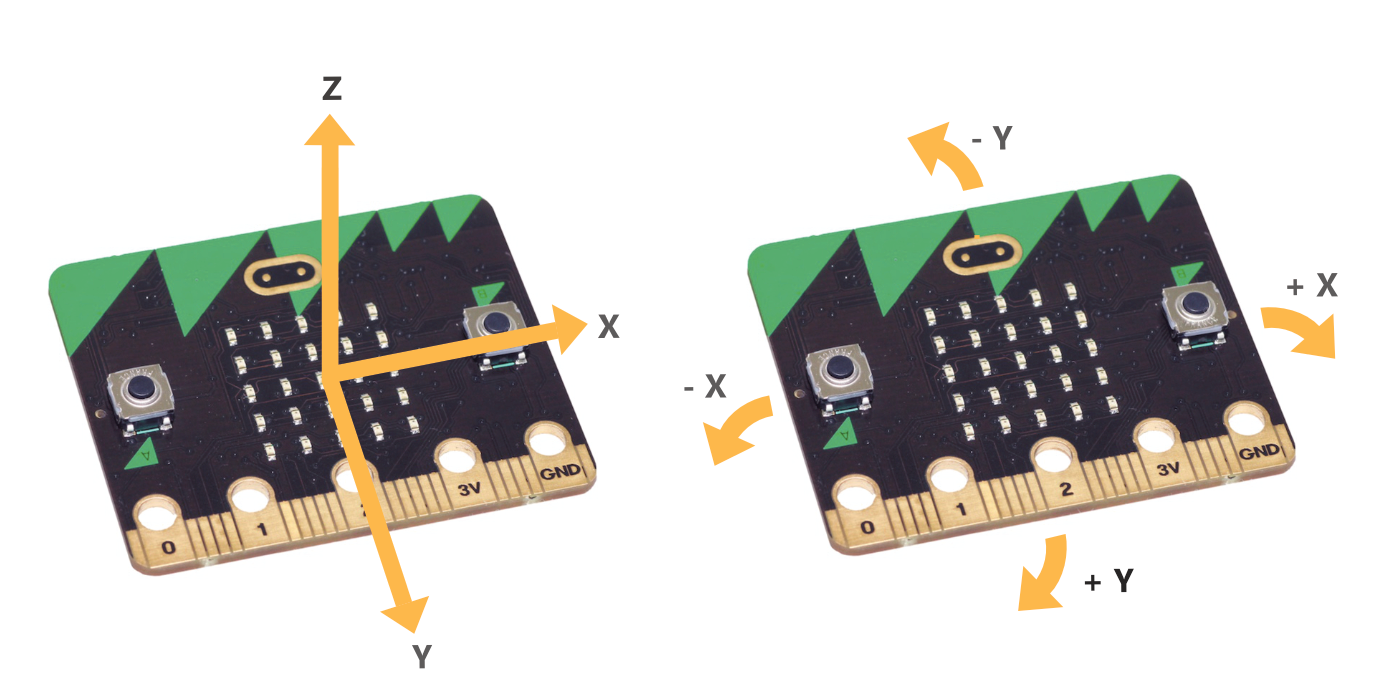
There are four functions for accessing the orientation data:
accelerometer.get_x()accelerometer.get_y()accelerometer.get_z()accelerometer.get_values()
The first three return a single int with the acceleration measurement in each axis measured in milli-g’s. The last returns all three as a tuple in x, y, z order.
Example#
from microbit import *

while True:
    x, y, z = accelerometer.get_values()
    print(x, y, z)
    sleep(100)
2.12.2. Gestures#
The available gestures are: up, down, left, right, face up,
face down, freefall, 3g, 6g, 8g, shake.
The currently detected gesture is returned as a string by
accelerometer.current_gesture()
You need to take regular measurements from the accelerometer so that it is active and detecting gestures.
Example#
from microbit import *

while True:
    # Keep accelerometer active x, y, z = accelerometer.get_values()

    if accelerometer.current_gesture() == "shake":
        print("SHAKE DETECTED!")

    sleep(100)