

4.4. Salting Passwords#
Given enough time and computational power it is possible to recover original passwords from cryptographic hashes. One common method is to precompute the hash value for common passwords. An attacker can then check the hash values against these precomputed values for a match.
To solve this problem, we can prepend or append a salt, which is a random value, to the start or end of the original password. This changes the output of the hash function.
Therefore an attacker would need to precompute hash values for each unique salt value, which is equal to the number of users. This additional layer of complexity makes the task of recovering original passwords for all users impractical.
For example:
The user registers with the password
"mypassword123"The server generates a random salt value e.g.
"3948ry10Xp"The server hashes the salted password i.e.
hash("mypassword1233948ry10Xp")generating a hash e.g."a9f3b8c2d6e7f1"The hash value and salt are stored in the database
We can see how this change is reflected in a User table:
Before
User ID |
Username |
Password |
|---|---|---|
1 |
alice123 |
342sckjn812123 |
2 |
bob_smith |
s0d9sucsxicbn9 |
3 |
admin |
cgasd8g123e9hs |
After
User ID |
Username |
Password |
Salt |
|---|---|---|---|
1 |
alice123 |
a9f3b8c2d6e7f1 |
3948ry10Xp |
2 |
bob_smith |
z4h7x9m2p8q3v6 |
m8t4z2q7x1 |
3 |
admin |
y5n3d8w2k6t4r9 |
k5r3y8n2v6 |
4.4.1. Recommended Video#
Code Challenge: Extension: Salty Passwords with Flask
Note
Complete Password Authentication > Code challenge: Users from Scratch before this exercise.
Modify your code for home() from “Users from Scratch” to work with salted and hashed passwords.
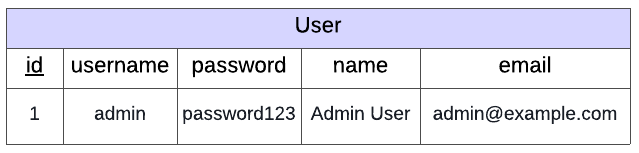
You have been provided with a scaffold with a simple database using Object Relational Mapping (ORMs covered in Programming for the Web > Object-Relational Mapping > Tutorial: ORMs in Flask). This database, instance/users.db contains user information but in this example it only contains a record for one user.
Warning
Do not edit this database.
The page should only allow users to log in with the following credentials:
username: admin password: password123

Instructions
You should only edit the home_post() function in app.py
Get the
usernameandpasswordfrom the form data
username = request.form['username']
password = request.form['password']
Query the
Usertable to see if a user exists with the given username and password
user = User.query.filter(User.username==username, User.password==password).first()
2.1 If the user exists then:
Hash the input password with
user.saltusinghash_password()Check that the hash matches the user’s salted and hashed password e.g.
user.password_hashIf the credentials are invalid show the login page with the error
"Invalid username or password"If the credentials are valid, show the success page with the given user details.
2.2 If a user doesn’t exist with the given credentials the query will return None. In this case render the login.html template providing error="Invalid username or password"
Download the scaffold and write your code in app.py.
SCAFFOLD_ext_salty_pwd_with_flask.zip
Solution
Solution is locked