

4.9. Sessions in Flask#
Flask provides a built-in way to manage user sessions using the
flask.session object. Flask’s session implementation is more general than
simply logging in users. It can be used to store any data we like, including a
user identifier.
From the flask documentation:
This is implemented on top of cookies for you and signs the cookies cryptographically. What this means is that the user could look at the contents of your cookie but not modify it, unless they know the secret key used for signing.
https://flask.palletsprojects.com/en/stable/quickstart/#sessions.
We can learn two important points about Flask’s session implementation from the quote:
they are client-side sessions
session data is securely signed using a secret key, preventing tampering.
4.9.1. Setting Session Data#
Within a Flask route function you can access the session object. This
object can be treated as a dictionary.
In the example below, there is a login route that sets the "user_id"
value to 12345.
from flask import Flask, session, request, redirect, url_for

app = Flask(__name__)
app.config["SECRET_KEY"] = "supersecretkey"  # Required for cookie signing


@app.route("/login")
def login():
    session["user_id"] = 12345  # Store user ID in session
    return redirect(url_for("index"))
4.9.2. Getting Session Data#
Retrieving data from the session is the same as using a dictionary. You can
check for the existence of keys using in and index into the dictionary
using the key name.
In the example below, the user_id is retrieved to display a user specific
message.
from flask import Flask, session, request, redirect, url_for

app = Flask(__name__)
app.config["SECRET_KEY"] = "supersecretkey"  # Required for cookie signing


@app.route("/")
def index():
    if "user_id" in session:
        user_id = session["user_id"]
        return "Logged in as user {}".format(user_id)
    return "Not logged in"
4.9.3. Removing Session Data#
To remove data from the session use pop.
In the example below, pop is used to log a user out.
from flask import Flask, session, request, redirect, url_for

app = Flask(__name__)
app.config["SECRET_KEY"] = "supersecretkey"  # Required for cookie signing


@app.route("/logout")
def logout():
    session.pop("user_id")  # Remove session data
    return redirect(url_for("index"))
4.9.4. Expiration#
By default Flask session data is only valid for the browser session. It will be deleted once the browser window closes.
This behavior can be changed by setting:
a value for the
PERMANENT_SESSION_LIFETIMEconfiguration parametersetting the
session.permanentattribute toTrue
In the example below, session.permanent is set during the log-in and set to
60 minutes.
from datetime import timedelta
from flask import Flask, session, request, redirect, url_for

app = Flask(__name__)
app.config["SECRET_KEY"] = "supersecretkey"  # Required for cookie signing
app.config["PERMANENT_SESSION_LIFETIME"] = timedelta(minutes=60)


@app.route("/login")
def login():
    session.permanent = True
    session["user_id"] = 12345  # Store user ID in session
    return redirect(url_for("index"))
More details here https://flask.palletsprojects.com/en/stable/api/#flask.session.permanent.
4.9.5. Security Considerations#
SECRET_KEYThis value must be kept private. Any disclosure of this value could lead to an attacker setting their own value for the cookies and signing it.
This value should be hard to guess. Use a CSPRNG to generate it.
Private Data
Do not store any private or sensitive data in the session object. It is transmitted as plain text.
Session Hijacking
If an attacker obtains any of the session cookie values, they can attach them to their own requests to impersonate a user.
To protect against attackers intercepting the cookies make sure to serve your site over HTTPS and restrict the cookie to be served over HTTPS only by setting
"SESSION_COOKIE_SECURE"toTrue
Cross Site Scripting
We will learn more about this in a later module, but it can be prevented by setting
"SESSION_COOKIE_HTTPONLY"toTrue.
Recommended settings are:
app.config["SECRET_KEY"] = "supersecretkey"  # Keep this private
app.config["SESSION_COOKIE_SECURE"] = True  # Only send over HTTPS
app.config["SESSION_COOKIE_HTTPONLY"] = True  # Prevent JavaScript access
4.9.6. Recommended Video#
The video below shows how easy it is to read the data in Flask’s session cookies.
Code Challenge: Client-Side Session and Login
Create a flask app that lets users login to view a dashboard page using Flask session .
You have been provided with a scaffold that contains a starting flask app and template. The page should only allow users to log in with the following credentials:
username: admin password: password123
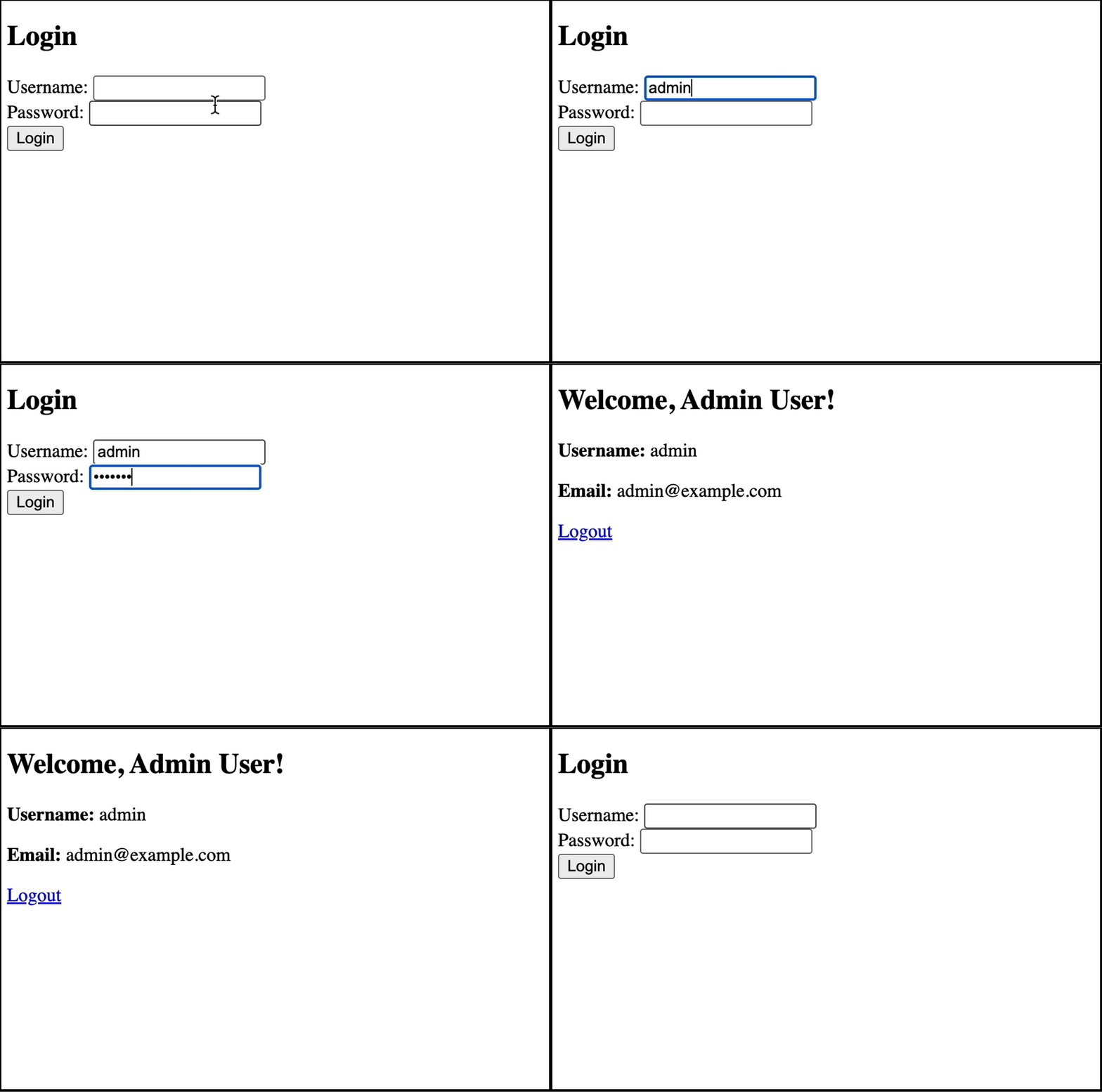
Note
Your app must behave the same as the “Server-Side Session and Login” tutorial but this time you must implement it yourself with client-side sessions.
Instructions
Do not modify the template files
Login
Edit the login_post() function in app.py to:
Get the credentials from the
POST-ed form data
username = request.form["username"]
password = request.form["password"]
Search the database for a matching user
user = User.query.filter(User.username==username, User.password==password).first()
If user is not found then return the login form with an error
if not user:
    return render_template("login.html", error="Invalid username or password")
Set the
user_idin the session storage
session["user_id"] = user.id
Redirect to the dashboard page
return redirect(url_for("dashboard"))
Dashboard
Edit the dashboard() function to:
Check for
user_idkey in session storage, redirect to the login page if not found.
if "user_id" not in session:
        return redirect(url_for("login_get"))
Check that a matching user exists in the database
user = User.query.filter(User.id == session["user_id"]).first()
Return the rendered dashboard
return render_template("dashboard.html", user=user)
Logout
Edit the logout() function to:
Remove the user_id value from session storage
session.pop("user_id", None)
Redirect to the login page
return redirect(url_for("login_get"))
Download the scaffold and write your code in app.py.
SCAFFOLD_client-side_session_and_login.zip
Solution
Solution is locked