

6.6. Design#
After the specifications have been decided, the design stage defines how the software will be structured to fulfill those specifications. The design should be a blueprint of how the application will be built.
The design must be informative enough so that development tasks can be assigned to individuals or teams in the organisation to complete. The design documents usually are a combination of:
written instructions
diagrams
block diagrams to show system architecture
class diagrams for models and objects
user workflow sequences to explain how users will experience the system
6.6.1. Elements of a Design#
System Architecture#
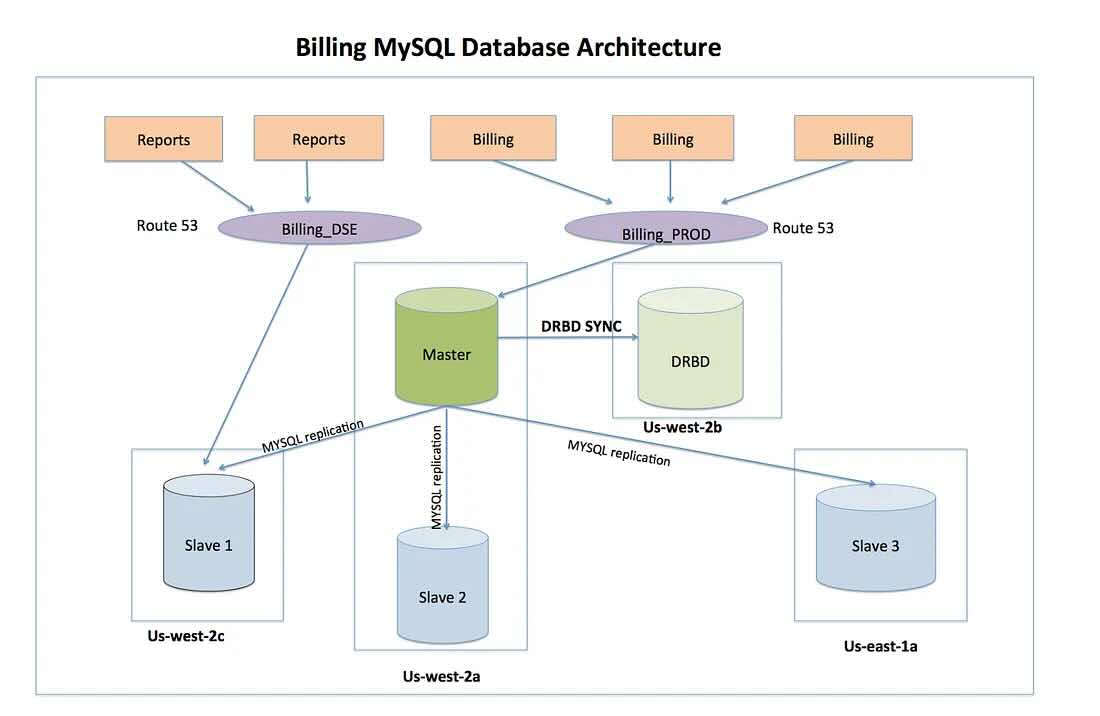
This outlines how the system’s high-level components database, application servers, front-end work together.
The best way to do this is with a diagram, since it allows everyone on the team to understand the big picture quickly, rather than having to read a long description.
Example
From the Netflix Tech Blog https://netflixtechblog.com/netflix-billing-migration-to-aws-part-iii-7d94ab9d1f59
Data Model#
This is where the database tables and columns are defined. You can write the specifications or create diagrams. Common diagram types are UML class diagrams and entity-relationship diagrams.
Example:
A users table with id, username, password_hash, email.
A reviews table referencing a users table if each review is linked to an author.
A comments table referencing both reviews (via review_id) and users (via user_id) for comment ownership.
Modules and Functions#
The code can and should be broken down into smaller modules or components that can be assembled together to form the larger application.
A highly detailed design would also specify which functions are to be built and how they should behave such as parameters and return values.
6.6.2. Examples#
Specification
“Passwords must be stored using a salted SHA256 hash.”
Design
“Create an auth module with a function hash_password(password) that uses hashlib.sha256 for hashing. Store the resulting hash in the users table.”