

1.8. Fitting a Linear Regression Model#
We are going to learn how to fit a linear regression model using sklearn.
You can read about sklearn’s linear regression model here.
We can import the function we need using the following:
from sklearn.linear_model import LinearRegression
Then we create a model:
linear_reg = LinearRegression()
Next, we give the model some data to fit. This is equivalent to the computer drawing a line of best fit to the data.
linear_reg.fit(x, y)
Note
x: must be a 2D array with \(n\) rows, one for each sample in the dataset and 1 column. An easy way to achieve this is to use
.reshape(-1, 1). This means-1rows and1column. The-1will act as a place holder, andnumpywill work out how many rows is required based on the specified number of columns, i.e. the data will automatically be reshaped into a column of data.y: must be a 1D array with \(n\) values, one for each sample in the dataset
We can then extra the intercept (\(\beta_0\)) and gradient (\(\beta_1\)) of our model using:
linear_reg.intercept_
linear_reg.coef_[0]
Note
.coef_ is a list. This means that you will need to use .coef_[0] to
extract out the value of :math”beta_0. Here’s an example of how we do
this with our study dataset.
from sklearn.linear_model import LinearRegression
import pandas as pd

data = pd.read_csv("study.csv")

x = data["Time Spent Studying (hours)"].to_numpy()
y = data["Exam Mark (%)"].to_numpy()

linear_reg = LinearRegression()
linear_reg.fit(x.reshape(-1, 1), y)

print(linear_reg.intercept_)
print(linear_reg.coef_[0])
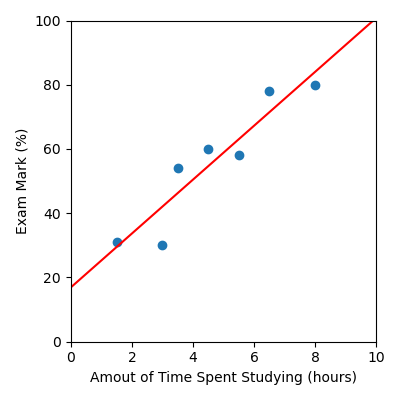
In this example the intercept is approximately 17, and the gradient is approximately 8, this means our linear regression model can be described by the mathematical equation:
This is what our model looks like:
Code Challenge: Build a Linear Regression Model
Let’s build our linear regression model on our movie data now.
Instructions
Copy and paste in your code from the Reading in Data With Pandas challenge that read
'Budget ($M)'and'Box Office ($M)'into numpy arrays (You will not need to plot anything for this challenge)Using
sklearn, create aLinearRegression modeland fit it to the movie datamovies.csvPrint the intercept and gradient, each to 2 decimal places
Your output should look like this:
intercept: X.XX
gradient: X.XX
Solution
Solution is locked